
Role
One worker in your crew - what it does, what it may touch, and which model it runs on.
In simple words
A Role is one worker on your crew. Think job description, not person: it says what this worker does, which kinds of step it may pick up, and how strong a model it runs on.
Open Crew in the dashboard sidebar, pick a crew, and the Roles section is a card per worker. Each card is the whole role, editable where it stands: Seats it takes, Profile (runtime), a permissions control, Skills, and Instructions.
The permissions control on the card is what decides whether this worker can change your code. Planner, architect and verifier ship Read only, and the reviewer ships review_exec - it runs commands but never writes. Only the executor and fixer are set to Can write, and only inside the run’s worktree.
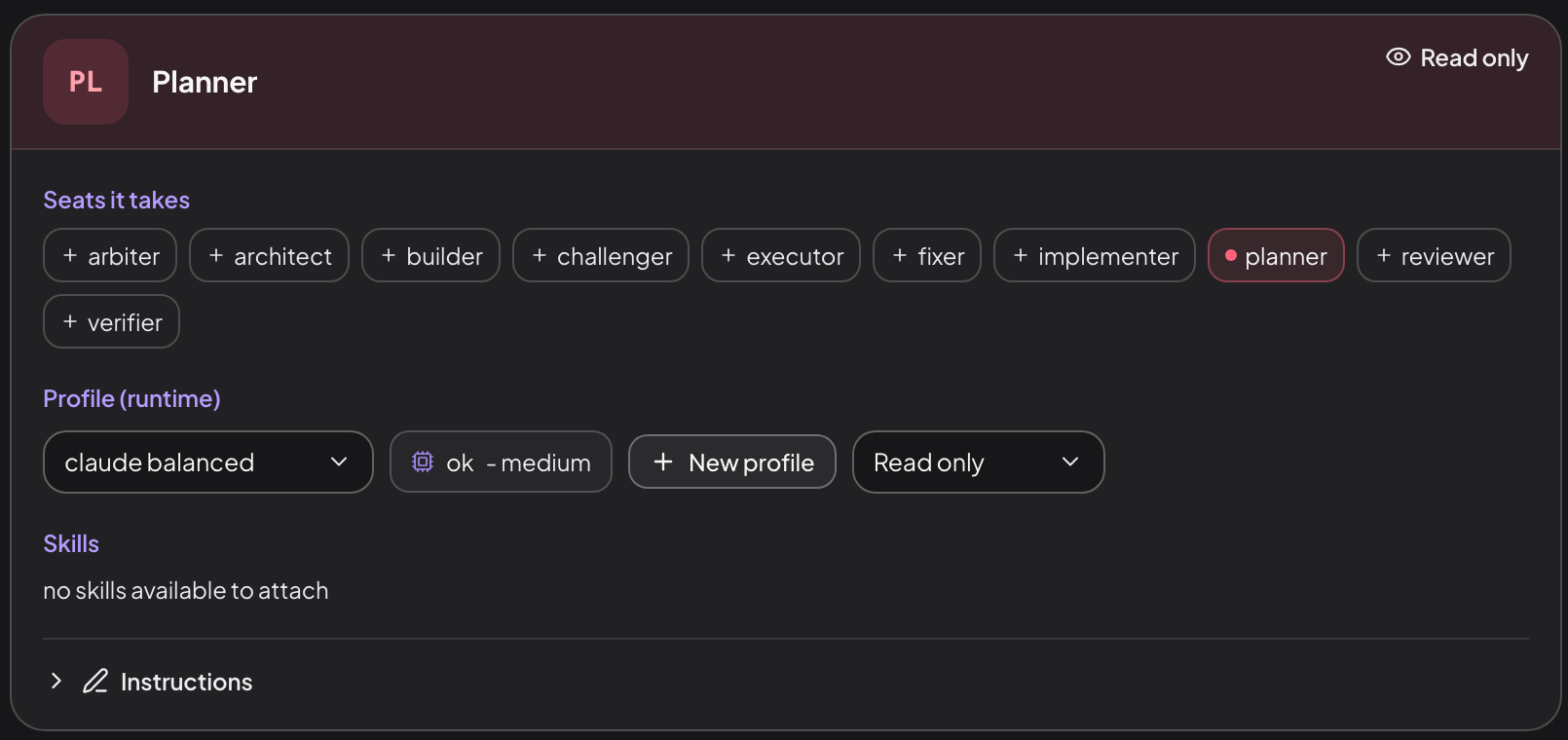
A role is its seats, its profile, its permission, its instructions and its skills.
Named roles are what make a run inspectable. The planner only plans and the reviewer only reviews, so when something goes wrong you can see which worker did it. It is also what lets you put a different vendor on review, so the reviewer does not share the writer’s blind spots.
The six that ship
vibe init writes six roles. Each fills the seat its id names, plus any others listed. A default run seats three of them - planner, executor and reviewer. The deep flow is what uses all six.
planner
Reads the task and produces a structured plan.
architect
Expands the plan with module boundaries and interfaces.
executor
Also fills implementer and builder. Edits files in the worktree, and self-reviews its own diff before hand-off.
fixer
deep’s answer to review findings, without rebuilding from scratch. A default run sends findings back to the executor instead.
reviewer
Also fills challenger. Judges the execution against the plan and the project rules; returns APPROVED, CHANGES_REQUESTED or BLOCKED.
verifier
Also fills arbiter. deep’s final gate before merge_ready.
Permissions
Read only (read_only)
Reads and reasons, never writes a file.
review_exec
Runs commands inside the worktree - the tests, the build - with no edit tools. What the scaffolded reviewer ships with.
Can write (code_write)
May edit files inside the run’s worktree.
That setting decides what the seat’s turn may do. For the agent to actually write, the underlying CLI has to allow it too: on a claude-code provider, a code_write seat’s turn gets --permission-mode acceptEdits. A review_exec turn gets the same mode plus an explicit command grant, so its checks actually run headless instead of hanging on an approval nobody can answer. Edit, Write and NotebookEdit are cut from its invocation, which removes the obvious way to change files but is not a wall - a shell can still write. What holds the line is that a shell-capable turn is diff-gated exactly like a writing one: its changes are snapshotted, scanned for secrets, put through the broker and can be rolled back. Read-only seats get no write grant at all.
Role, profile, provider
- A role is the behaviour. The Reviewer.
- A profile is how strong or expensive it runs.
claude-balanced. - A provider is the tool behind that profile.
claude.
One profile can back many roles, and one provider can back many profiles. New profile on a role card mints one and assigns it in a single step, so a claude-cheap gets created exactly where a role needs it.
What a role carries
| Field | What it is |
|---|---|
seats | The seats it can fill. A flow step matches a role through this list. |
profile | The profile it runs on, and the only route to a model. |
prompt | Path to its JSON role file, which holds the instruction text. |
permissions | The permission profile id: read_only, code_write, and the rest. |
skills | Skill packs loaded into its prompt. |
mcpServers | MCP servers it declares directly, merged with what its skills contribute. |
label | What the dashboard shows. Defaults to the role id. |
The crew-scoped wiring lives in project.yml while the instruction text lives in
the role file, so the same role file can be pointed at by two crews that differ
only in the profile they run it on. The shape is crewRoleConfigSchema in
src/agents/role-schema.ts.
How its prompt is assembled
Vibestrate stacks these into one prompt before the role runs:
The run records the resolved role per step (resolvedRoleId, resolvedRoleLabel) in flow.json.
Writes are gated
Three dashboard requests write a role, and every one crosses the Action Broker as a file.write: PATCH /api/crews/:crewId/roles/:roleId for the wiring in project.yml (audited role-fields), PUT .../context for the instruction text (role-prompt), and POST /api/skills/:skillId/assign for the skills list (role-skills).
Gating all three is what makes a denying policy hold across one Save in the crew editor, which issues them as separate requests. With only the prompt gated, a policy refused the instructions while a Read only to Can write flip landed. Skill assignment is in the set for the same reason: a skill is instruction text replayed into every turn and can carry MCP servers, so assigning one hands a role new tools.
A role lives in two files, and one pathGlob rule covers both. Every write presents the same pair of paths - subject.path, where the bytes land, and subject.files, the pair the grant spans - and a pathGlob is tested against all of them. A rule scoped to **/.vibestrate/roles/** and one scoped to **/project.yml each refuse all three. Such a rule is wider than it reads: one written to freeze a role’s instructions also refuses a label rename, and require_approval is not accepted on file.write, so there is no softer landing than a refusal.
The CLI is deliberately outside this. vibe init, vibe config, vibe crew and vibe skills assign write the same config through the same code with no gate. A gate there could refuse a first-time init before a project has any policy to consult, and those callers are you at your own keyboard rather than a page in a browser.
From the terminal
vibe shell lists the roles on its [3] Crew page, and its [8] Skills page attaches a skill to one with the arrow keys. On the command line:
vibe crew show default              # every role, its profile, its seats
vibe skills assign <role> <skill>   # attach a skill to one role
vibe config show                    # the crews block as loaded
A role is a row inside a crew, under that crew’s own roles map. There is no top-level roles map, and the role file it points at is JSON, not Markdown, with an id matching its filename. The annotated crew config shows both, field by field.
Next: profile is how strong or expensive a role runs.
