
Crew
The team of AI workers you cast, and which model each one runs on.
In simple words
A flow says which kinds of worker a job needs - someone to plan, someone to build, someone to check - not who.
A Crew is who shows up: a roster of workers, each pointed at a model. One crew might be all Claude, another might have Codex build and Claude review. The flow does not change either way.
Each worker is a role, answering two questions: which kinds of step it can take, and which model it runs on.
vibe ui opens the dashboard on 127.0.0.1:4317, and Crew in the sidebar lists your crews, one card each, carrying Configure, Edit roles and Set default. Here is the crew vibe init gives you:
You do not need a second crew to change how a run behaves. A different model lives on the role’s profile. Reach for a second crew when you want a different team, like an all-local one.
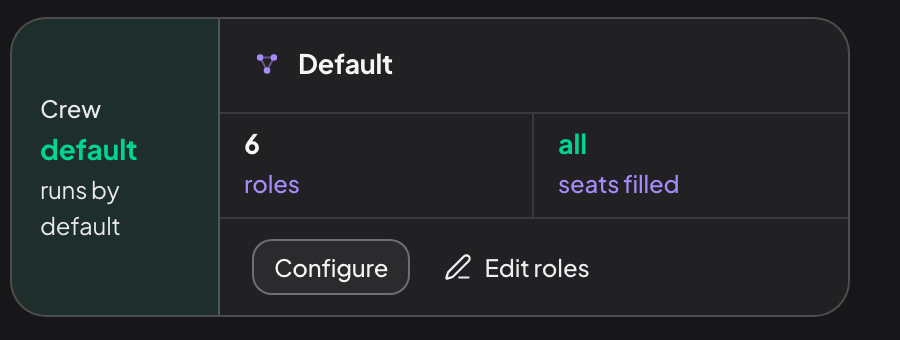
Every seat the flow asks for is covered, and this crew runs unless a run names another.
One role can cover several kinds of step, which is why six workers can staff the eight-step deep flow. The executor role in the scaffold takes implementer, executor and builder, and the default flow seats three of the six roles per run.
Why you would cast a second crew
Have one model check another Codex on the role that builds, Claude on the role that reviews, so the diff is not marked by whoever wrote it.
A cheap team and a careful team
A fast crew for a rename, a thorough crew for a migration. Same flows, different roster, chosen per run.
Work entirely offline
A local crew points every role at a provider on your own machine, so no code leaves it.
A task uses exactly one crew, picked in the New run composer or left to the default.
Ready-made crews
Presets sits below your crews, one card each with Add to crews. A preset reuses your default crew’s workers, so a flow’s seats stay covered: it changes how the team runs, not who is on it.
fast
Lowest effort, fewer review passes. Quick, low-stakes work.
thorough
Highest effort, extra review passes. Risky or complex work.
cheap
The provider’s cheapest model at low effort. Keeps spend down.
local
Runs on a provider on your own machine, off cloud APIs.
Installing one saves a crew and the profile it runs on. Nothing runs until you pick it.
A preset refuses rather than quietly copying your default crew. fast and thorough need a provider with effort control, cheap needs one with a designated cheap model, and local needs a local provider separate from your default. A card that cannot fit says which case it hit and offers the route forward.
Inside one crew
Configure opens that crew’s own page: a header counting its roles and filled seats, a seat panel pairing every seat against the role that takes it, and a Roles card per worker, editable in place - seats, profile, permissions, skills and instructions.
Matching reads names, not order: a flow step names a seat, the crew’s roles declare which seats they take. Two ways that fails, both loudly and before any model is spawned:
No role takes the seat The run refuses to resolve and names the seat to add to a role’s Seats.
Two roles claim it
The run refuses the same way and asks you to pick one, with --seat-role <seat>=<role>.
A half-staffed run that discovers the gap three steps in has already spent tokens and written code.
What a crew carries
| Field | What it is |
|---|---|
roles | The roster, keyed by role id. Everything else on a crew is an override. |
label | What the dashboard shows. |
maxReviewLoops | Per-crew override of the global review and fix cycle count. |
checklistReviewLenses | Per-crew override of the lenses a per-item review runs under. |
A crew is mostly its roster: the two overrides exist so a fast crew can do fewer
loops and a security crew can aim every per-item review at auth and secrets,
without either of them editing a flow. The shape is crewConfigSchema in
src/agents/crew-schema.ts.
Adding and removing roles
Edit roles opens the crew editor; New crew opens it on a blank one. One screen holds every role’s parameters beside its instructions, next to a Seats panel that assigns a role per seat.
Which flows this covers in that panel is the check worth reading before you save, because casting is where a crew fails and it fails at launch rather than during the run. Each flow reads one of three things:
- Runs - every seat the flow asks for has exactly one role.
- Needs a pick - two roles take the same seat. The run starts only if it names which one.
- Cannot start - a seat no role takes. Nothing will start this flow until you fill it.
Both failures stop the run rather than warning: resolving a flow fills every step’s seat before anything is skipped, so an optional step’s empty seat is just as fatal as a required one’s.
Two kinds of change live there, kept apart on purpose:
- Saved from the page. A role’s instructions, and its parameters on a crew that already exists. Save writes the role’s file and updates the crew in place.
- Saved by hand. Adding, removing or renaming a role, changing the crew’s name or its review loops, and everything about a new crew. The editor prints the exact bytes to paste.
Structural edits change what every future run does, so they go through a diff you read.
From the terminal
vibe shell shows the same roster on its [3] Crew page, to be checked rather than edited. The command line is the automation path:
vibe crew list                        # every crew, default marked
vibe crew show default                # roles, profiles, seats
vibe crew use thorough                # change the default
vibe crew presets add thorough        # install a ready-made one
vibe crew draft "an all-local crew"   # a roster proposal, printed, never written
vibe run "task" --crew thorough       # one run on another crew
A crew is a row under crews in .vibestrate/project.yml, and each role points at a prompt file under .vibestrate/roles/. Both are committed, so a teammate who clones the repo gets your roster. The annotated block explains every field.
Next: role goes through one worker in detail.
