
Full walkthrough
This page covers the dashboard, flows, crews, policies, spec-up and the merge path.
In simple words
A run is one pass over one task: it opens a second checkout of your repository in a separate folder, works there on a branch of its own, and hands the result back to you.

The quick start takes one task to a merged change in a few minutes. The dashboard also explains itself: ask the supervisor how to do something and the answer arrives with a Show me how button that moves you to the right screen and rings the control it is talking about. See walkthroughs.
What you will be able to do
Pick a flow per task Know when the default is wrong and what to use instead.
Split a run across providers So the model judging the diff is not the model that wrote it.
Write rules the reviewer enforces Your conventions, checked on every run.
Take a change to main yourself Read the diff, ask the advisor, merge deliberately.
Every run gets a docker-style id like bold-lovelace, used verbatim as the branch suffix and the worktree folder name. One string identifies the run, its branch and its folder.
The dashboard
vibe ui opens it on 127.0.0.1:4317 and keeps a scheduler behind it, which executes the runs you start from the browser. Nothing outside your machine can reach it.
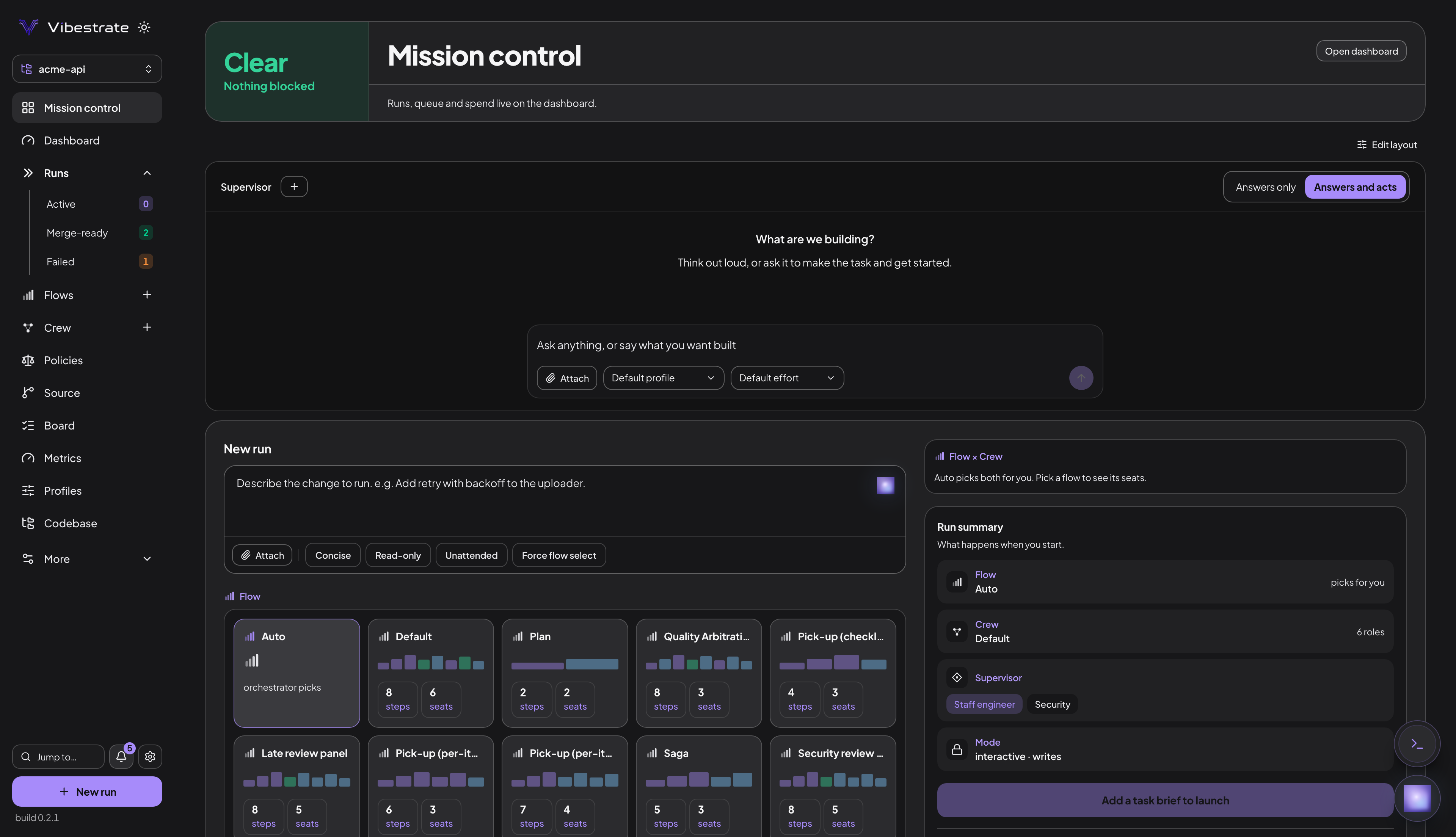
That left sidebar is the whole app. Runs carries Active, Merge-ready and Failed counts, More holds Supervisors, Proposals, Setup, Project, Config and All projects, and New run is pinned to the foot of every screen.
vibe shell is the same surfaces without leaving the terminal: Dashboard, Flow, Crew, Profiles, Runs, Approvals, Suggestions, Skills, Roadmap and Doctor as numbered tabs, with a : palette for Config, Consult and Notifs. vibe on its own opens it.
The dashboard loads, and a tab sits empty though you have runs. It reads .vibestrate/runs/ from the directory vibe ui started in, so a server launched outside your project root reads an empty project. Stop it and start it from the root. If the root was already right, hard-reload once (Cmd-Shift-R, or Ctrl-Shift-R on Windows) to drop a cached asset bundle.
cd /path/to/your-project && vibe uiMission Control
Mission Control is the screen it opens on; its panels drag and resize once you turn on edit mode, and each browser remembers its own arrangement.
The Supervisor panel is the judgment layer over your runs. A supervisor is a persona, staff-engineer out of the box, which picks the flow when you do not name one, pushes a risky task toward heavier review, and records the reasoning under Flow & why on the run page. Its judgment adds review and never removes it, and an explicit flow overrules it. A Waiting on you section appears below whenever a run is parked at an approval gate, with Details, Approve and Reject on each card.
Consult, the orb in the corner, answers from your own config, policies, runs and code. Ask about this project never edits anything; the most it leaves behind is a pending review rule or a proposed edit to VIBESTRATE.md, neither taking effect until you confirm it. That manual is this project’s durable operating guide, read by consult rather than by a run, and a separate file from the .vibestrate/rules.md every agent reads on every turn. Work in Vibestrate can create a task, add a checklist item or start a run, and ships refusing all three because supervisorControl.autonomy starts at advise. Turning that up needs a budget ceiling first, since config validation rejects an unbounded act, and the Supervisor panel’s Answers only / Answers and acts switch overrides all of it as a kill switch.
vibe budget set --max-turns-run 40
vibe config set supervisorControl.autonomy act
More: Mission Control.
Starting a run
New run takes your brief under Task, then Flow, Crew and Configuration, and a strip at the foot of the page header mirrors the exact vibe run command it is about to execute. Plan first beside Start run sends the brief through spec-up instead. The quick start walks that page field by field.
All runs lists everything the project has recorded, filtered by Active, Merge-ready or Failed from the sidebar, with Replay on each row for a read-only walk through a finished one. The Board is the task list those runs can be started from.
Inside one run
Open a run and the page carries its whole state, with the diff behind it:
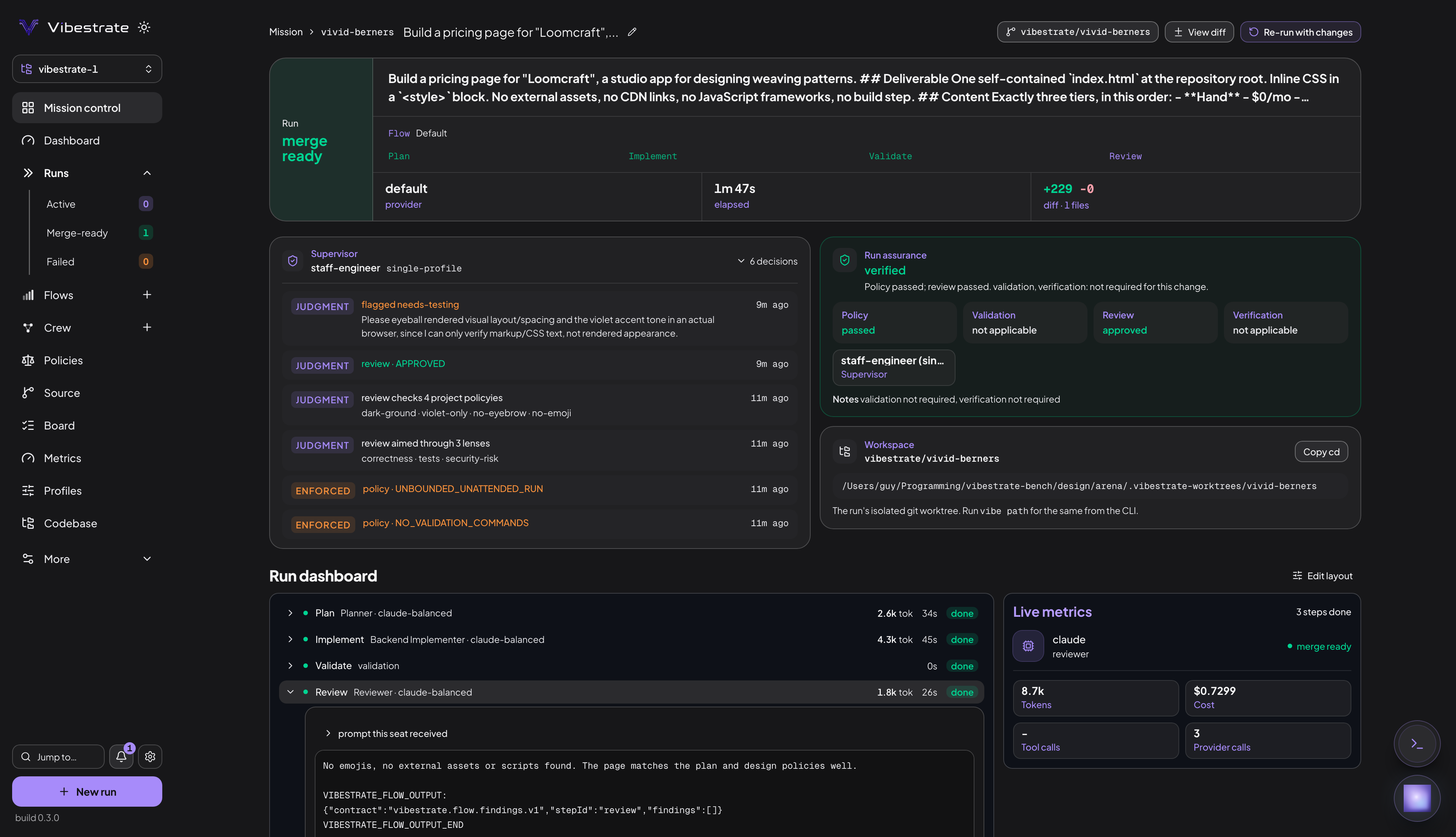
The status card carries the outcome. merge ready means nothing stopped the run, so the branch is yours to take: Vibestrate holds there and never merges or pushes on its own.
Run assurance splits that outcome into four lanes. Policy records what the Action Broker allowed and refused, so it reports on the gate rather than on the rules you authored, and a violation there is graded harder than a failure - the verdict comes back unsafe, because a refused action can leave the worktree half-written. Validation is your own commands, Review is the reviewer seat’s verdict on the diff, and Verification is the verifier’s separate pass; all three read not applicable when the flow asked nothing of them, so an empty lane never passes as a check. The headline grades what did run: verified, partially verified, unverified, unsafe or blocked. View review, Re-run with fixes and View validation sit beside it, and vibe assurance <runId> prints the same verdict.
View diff opens the Artifacts tab on the changed-files list, where picking a file toggles between its diff and the whole file as it now stands. Workspace holds the worktree path and a Copy cd button. Terminal opens a shell inside that worktree, and policies.allowInteractiveTerminal starts off.
What a run actually does
A flow is the recipe a run follows: an ordered list of steps. A step names the kind of worker it needs and never names a model. That kind is a seat, and the roles in your crew fill the seats. Each role runs on a profile: a provider, a model, and how hard that model should think.
The four steps
The default flow plans, implements, validates and reviews, and the reviewer can send the work back to the implementer twice before the flow gives up:
deep is the longer pipeline: plan, architecture, implement, validate, review, fix, re-validate, verify. It seats six and keeps a dedicated fixer answering the review rounds, for work where an architecture pass and an independent verify gate earn their turns.
Which seats can write files
A fresh project hands code_write to the roles filling implementer and fixer, review_exec to the reviewer - commands but no file writes, so it can run the tests it is judging - and read_only to the other three, file writes and shell access turned off. Validate names no seat, so no model runs it: your own commands.validate do, inside the run’s worktree. That list is read-only on the Config page because the server never executes a shell command string handed to it over HTTP; vibe config set commands.validate writes it. A pass or a fail there is evidence for the reviewer to weigh, and only the reviewer can call for a fix.
Crews, flows and the Flow Hub
The flows that ship
Sixteen flows ship. Three belong to the spec-up chain below and stay out of the pickers, so thirteen show up:
Flows lists the same thirteen, each card carrying a bar of one segment per step, coloured by what that step does:
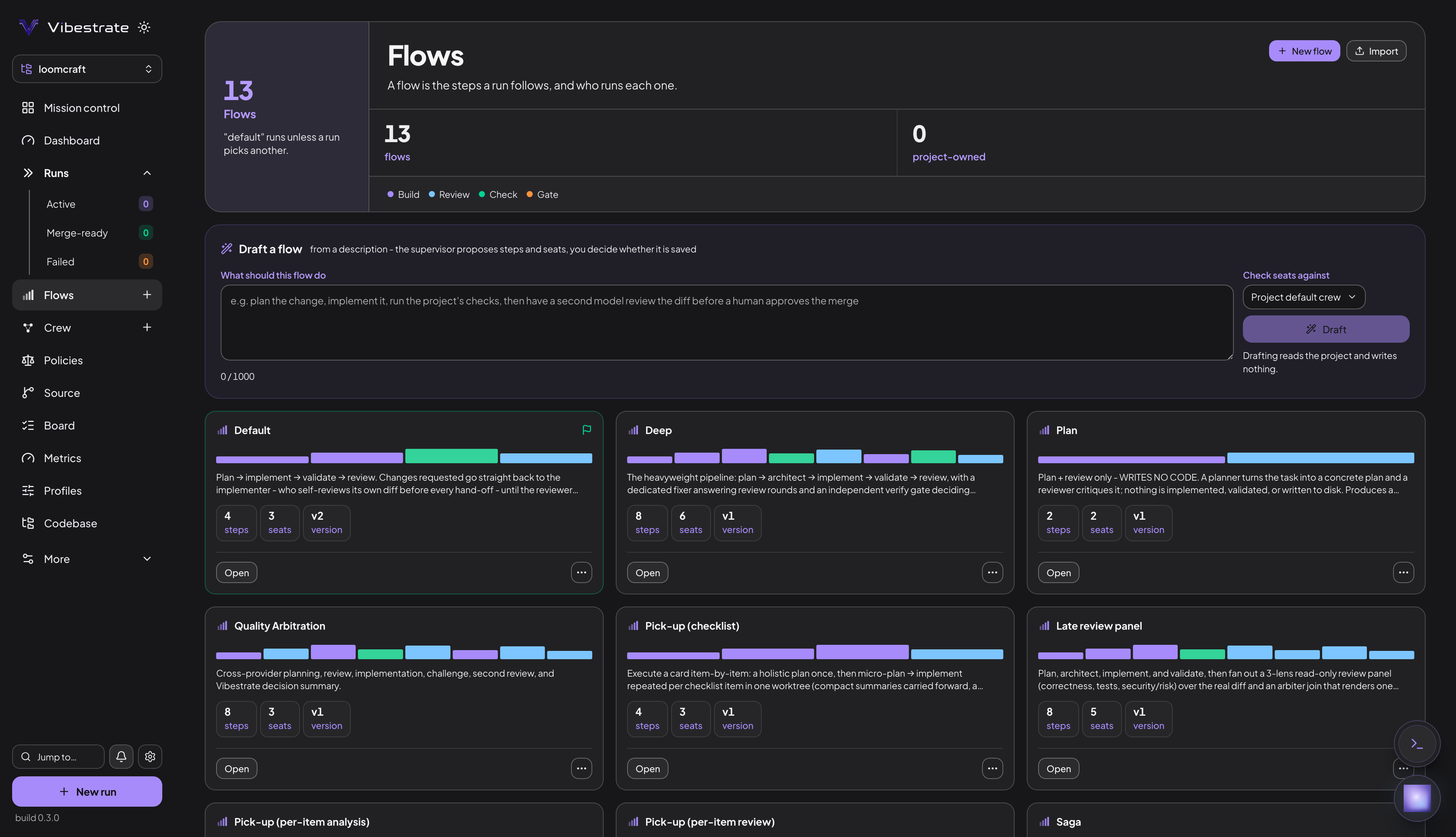
Four colours group the six kinds a step can carry. Build takes the Build and Revise kinds, which produce or change the work; Review takes Review and Summarize, which judge it; Check runs your commands; and Gate is the Approve kind, which parks the run until a person answers. No built-in flow ships a Gate, so that colour turns up only in a flow you write or install.
New flow opens the builder, Import takes YAML or a URL, and Draft a flow further down the page turns a plain-English description into a proposal you decide whether to save. In the terminal those last two are vibe flows import <file|url> and vibe flows draft "<description>"; vibe flows list prints what was discovered, and vibe run "<task>" --flow security-review pins one.
Whether your crew covers a flow
The Crew page’s ring shows coverage, and vibe flows show <id> --crew <id> prints it per seat: filled, gap or ambiguous. Each seat needs exactly one candidate, or a --seat-role pin, and an unfilled or ambiguous seat stops the run before it spawns any model. Out of the box every seat resolves, so this comes up only once you add roles: Crew "default" has more than one role filling the "reviewer" seat means two of yours qualify, and --seat-role reviewer=senior-reviewer picks one.
Coverage is a name match, and the order the two are written in changes nothing. A default run seats three of the six roles a fresh project writes; deep seats all six:
Splitting a run across two models
One role answers for several seats. The default executor role takes implementer, executor and builder, and the reviewer role takes reviewer plus challenger, so six roles cover all nine seat names the built-in flows ask for.
Every run comes back Review decision: APPROVED. A fresh project points all six roles at one profile, so the model checking the work is the model that wrote it, and a model reading its own diff can only lower its own confidence. Cross-model review starts with a second profile on a different provider.
On Profiles, add one on a second provider; on Crew, open the crew and move the reviewer role onto it, and the verifier too for the flows that seat one, like deep and express. Configure that provider first, or the profile is refused with Provider "codex" is not configured.
vibe profile add second-opinion --provider codex --model gpt-5.5 --power high
vibe config set crews.default.roles.reviewer.profile second-opinion
vibe config set crews.default.roles.verifier.profile second-opinion
vibe crew show default
The Crew page
The ring is one arc per seat. Its count runs to ten: the page adds the seat names your own roles declare on top of the nine the flows ask for. The Providers tab beside it is where the local CLIs are detected, set up and tested.
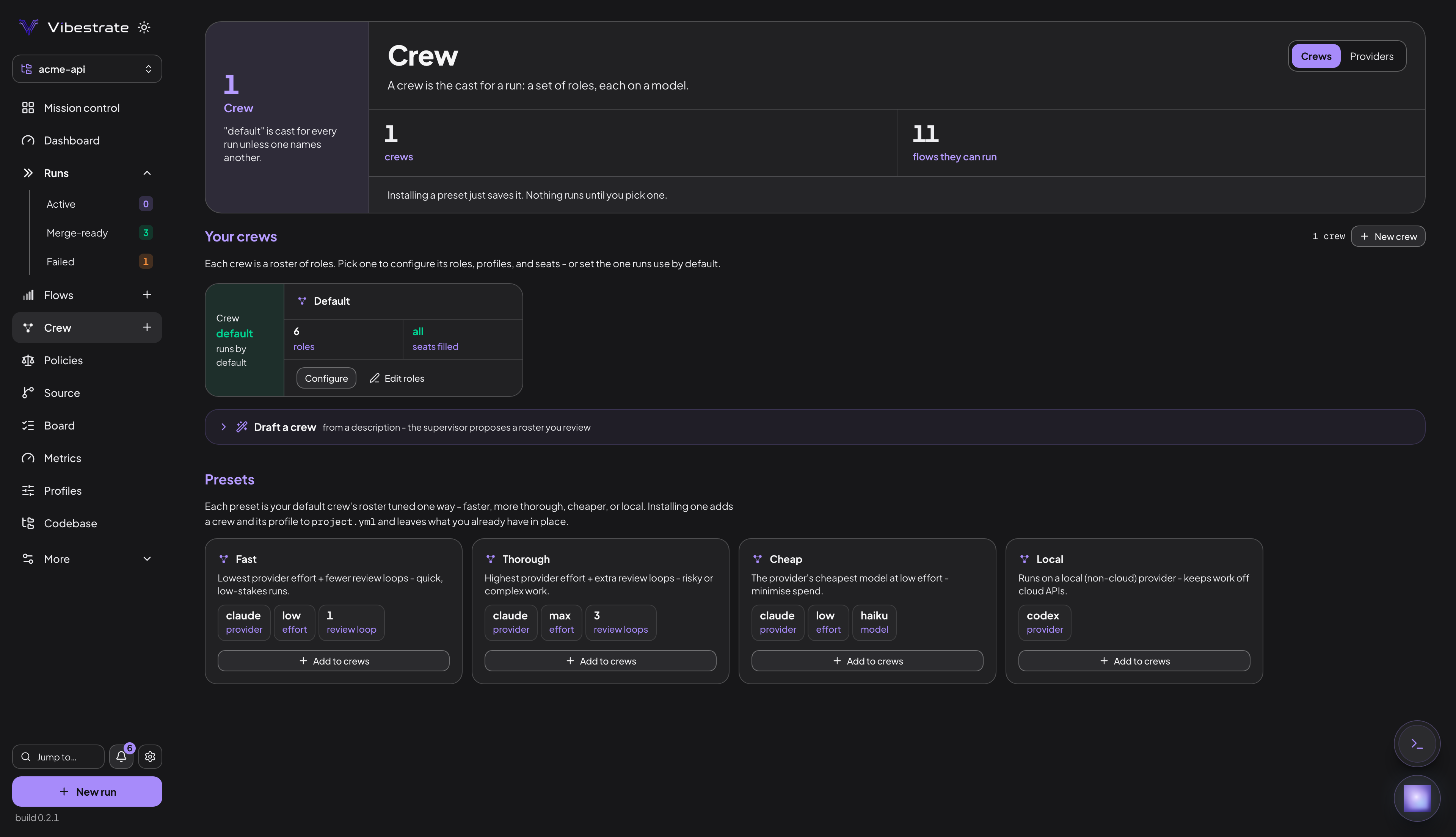
vibe crew presets add <id> installs a ready-made crew - fast, thorough, cheap or local. The Flow Hub is the community catalog of flows other people published; the Flows page browses and installs from it, and vibe flows hub list then vibe flows hub install <handle>@<name>:<version> do the same from a terminal. Read the YAML before you run it, because a downloaded flow runs commands on your machine.
Your rules, and planning before building
Rules the reviewer enforces
Rules you write yourself are policies, and they get a top-level sidebar row because this is the one surface where your rules outrank the model’s judgment. (.vibestrate/rules.md is a separate thing: free-text project context every agent reads.)
New policy opens the one authoring form: the rule in plain English, a tier select reading advise or block, then either a suggested fix or a matcher regex. Draft turns the sentence into a drafted rule to edit, Test checks a matcher against sample text, and nothing saves until Add policy. Below your rules sit the Deterministic engine and the Hard guards, four switches that ship on and read 4/4 in the header.
An advise policy is text appended to reviewer turns, so a model does the judging, and at most twelve reach any one review. A block policy is a regular expression run over the lines the diff added, and one match caps merge-readiness even on a run the reviewer approved. More: Policies.
vibe policies add prefer-async "prefer async/await over .then() chains" --fix "rewrite as async/await"
vibe policies add no-console "no console.log in shipped code" --block --matcher "console\\.log\\("Refusing to start. The policy set in .vibestrate/policies/ did not fully load before a single step runs. A rule file in that directory failed to parse, or two of them declare the same rule id. That directory is a separate surface from the project.yml policies above, and a set that doesn’t fully load stops run creation rather than being skipped. vibe policies doctor names the file and the reason.
Spec-up, for a greenfield brief
Spec-up fires without you asking. Hand an ordinary run a brief that reads greenfield and Vibestrate swaps it for a read-only intake that writes no code; Plan first on the New run page asks for the same thing deliberately.
The intake run’s page then carries a Scope the work panel: the gaps it found, grouped, with a field per question and a Suggested answer you can take as-is. Suggest all here drafts the rest of a group. Submit answers sends what you have and asks follow-ups only where something is still open, Proceed to spec stops the questioning, and Build the spec writes the spec, architecture and risks.
From there, Approve & build launches the build from the approved spec, and Generate roadmap turns the finished run into a proposal whose Create board cards puts the work on your Board. A run started from a card carries the approved spec with it.
The same chain from a terminal, each command printing the run id the next one needs:
vibe spec-up questions <intake run id>                       # the gaps, each with a kebab-case id
vibe spec-up answer <intake run id> --answer data-store="Postgres, single tenant"
vibe spec-up answer <intake run id> --proceed                # prints the spec run id
vibe spec-up build <spec-up run id>
data-store is a placeholder: the model writes its own id per question, and vibe spec-up questions prints the real ones to pass back verbatim. The roadmap route is vibe spec-up approve, then vibe spec-up roadmap, then vibe roadmap accept <proposalId>. --no-select skips the detour for one run, and adaptiveSpecUp: off opts out entirely. More: Spec-up.
The merge path
A change crosses three branches: the run’s own, which forks from main when the run starts, a staging branch you name, and main.
Source > Merge is that path in the dashboard: it lists every merge-ready run, Get merge advice opens the read-only verdict, the integration/branch field and Integrate this run do the staging merge, and Complete merge to main asks you to confirm before running a local git merge. Nothing is ever pushed. Analyze the diff adds an optional model read, advisory only. The Tree tab draws the commit graph and previews a merge before it happens, with undo one click away.
vibe integrate advise, apply --into and finish --confirm merge-to-main are the same three steps in a terminal. The quick start walks them, and Keep a change is the long version.
Which runs arrive committed
A run on the linear flows - default, deep, express, panel-review, security-review, plan-only, scaffold, quality-arbitration - leaves its edits uncommitted in the worktree, so the commit message stays yours to write. Read the diff and write that commit, or the merge lands a clean nothing:
cd "$(vibe path bold-lovelace --cd)"
git diff main
git add -A && git commit -m "Add structured logging to the settings save handler"
cd -    # back to your project
That cd - matters. Vibestrate reads the git root of wherever you stand to work out which project you mean, and inside a worktree that root is the worktree.
The other four - pickup, pickup-analysis, pickup-review and saga - walk a board card’s checklist and commit each item as it lands, so a run started with vibe tasks pickup or vibe tasks sequence reaches you already committed.
When you are stuck
The stuck-point boxes on this page and the quick start sit beside the step that produces them. These four turn up anywhere:
| Symptom | Cause | Fix |
|---|---|---|
| Run completes, worktree unchanged | A type: cli provider gets no write grant | vibe config set providers.claude.type claude-code, or policies.strictApplyOnly true on the rest |
error: unknown command 'merge' or 'diff' | Neither command exists | Source > Merge, or vibe integrate advise <runId> |
| A greenfield brief ends with an empty diff | Spec-up swapped the run for a read-only intake | The run page’s Scope the work panel, or vibe spec-up questions <runId> |
| Run files are nowhere in your repo | The worktree is a sibling directory | The run page’s Workspace panel, or vibe path <runId> |
Ask about any of it through the Consult orb, or vibe consult "why did bold-lovelace end blocked?". Consult also reads Vibestrate’s own documentation, and every answer carries a confidence level next to whatever it could not verify. A review rule it proposes lands as a pending advise policy, waiting on Confirm on the Policies page or vibe policies confirm <id>.
Keep going
- Quick start - install, connect a model, and take one task to a merged change.
- The big picture - the same vocabulary, with the reasoning behind each piece.
- The interactive shell - the same surfaces without leaving the terminal.
- Safety - the Action Broker, gates, and what a run can and cannot touch.
- Troubleshooting - the long version of the table above.
