
Task
The plain-language brief you hand Vibestrate. A sentence is enough to start.
In simple words
A Task is what you want done, written the way you would brief a capable colleague. You say what you want; Vibestrate works out the steps. No file lists, no ordering.
Tasks live on the Board: vibe ui opens the dashboard on 127.0.0.1:4317, and Board is in the sidebar. Four tiles read Active, Awaiting, Blocked and Done; five columns hold the cards - Planned, In progress, Needs testing, Completed, Archived. The Ledger tab beside it says where the project stands: shipped, open and decided.
New task asks for a title, an optional roadmap initiative to file it under, and Plain run or Supervised (steps). The card holds the rest: Brief, Acceptance criteria, a checklist, Runs, Comments, Details and Run settings. Start task turns it into work.
For a one-off brief with no card to keep, New run at the foot of the sidebar takes the sentence alone, with Flow, Inputs, Crew and Configuration beside it. Mission control carries a second composer for the same job, a panel with a Run summary rail:
Leave the Flow picker on Auto to begin with: the orchestrator reads the task and picks, and every run records what it chose. The Crew picker marks your project default the same way. Naming them yourself is worth doing once you disagree with a choice.
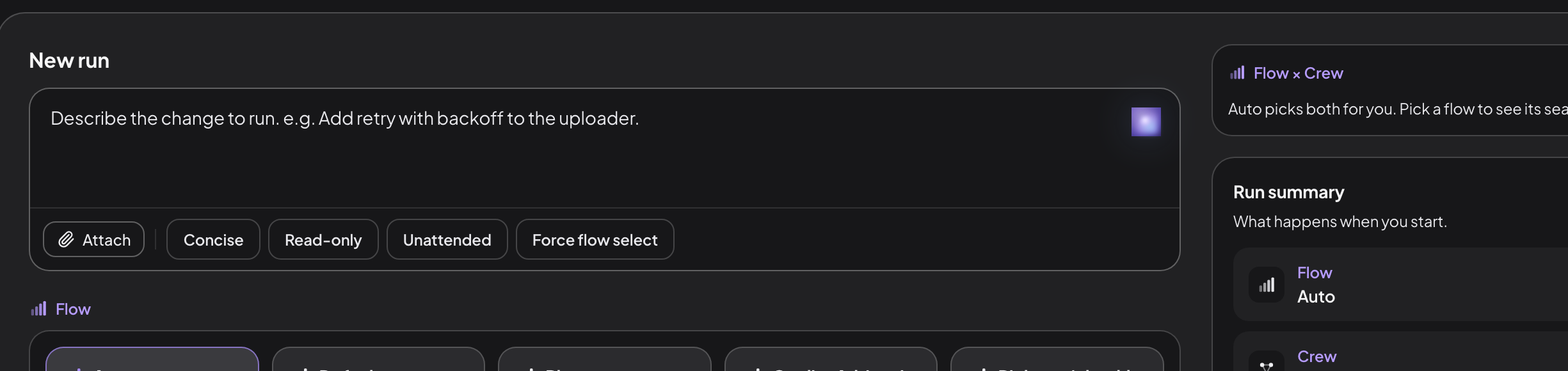
The box is the task; everything around it is optional. The two composers differ in wording, not in what they start: the panel offers Attach and Force flow select, while the New run page calls the same choice Auto-pick flow and takes attachments as inputs.
A task that reads like “build me a whole system” does not go straight to code. It is routed through a read-only spec-up chain first, which asks you questions and produces a written spec, and only then runs the flow seeded with it. Vague briefs get clarified rather than guessed at.
What a task becomes
A task becomes a run: one supervised attempt in its own copy of your repository, following a flow (the recipe of steps) staffed by a crew (the workers). A run never pushes and never merges; it ends with a diff that is yours to land.
Four verdicts are possible:
Every prompt, output, metric and decision is written under .vibestrate/runs/, in a directory named for the run (ids are adjective-noun, like bold-lovelace). Run state has the status list; Steps has the step-by-step path.
Writing a good one
The description goes into every agent’s prompt at every stage: the planner plans from it, the implementer builds from it, the reviewer checks the result against it.
Say what, not how “Add retry with backoff to the uploader” beats a list of files to edit; the plan step turns intent into steps.
Name the constraint that matters “…without changing the public API” or “…it must stay under the existing timeout”. Constraints are what review checks against.
Say how you will know it worked “…with a test that fails on the old behaviour” gives the verify step something concrete.
One change per task Two unrelated changes in one brief make a diff nobody wants to review, and a verdict that cannot be partial.
A brief with anchors in it:
Add structured logging to the settings save handler in
src/server/routes/settings.ts. Use the existing logger from
src/lib/logger.ts. Include the user id and the changed keys,
but never the values.
The same goal without any:
Improve loggingPlausible in, plausible-but-wrong out. A vague Task produces a vague plan, and the reviewer approves it, because it checks against the same vague brief. Tighten the Task and the whole chain sharpens.
A Task says what to build. It does not pick your model or set how hard it thinks - that belongs to your Crew and its Profiles. Conventions, security rules and domain language belong in skills, not in every brief.
Checklists: break a Task into items
A Task can hold an ordered checklist, the concrete breakdown of the work. Items live inside the card, so context stays in one place instead of scattering across small cards.
The checklist sits on the task detail page. Each row can be checked off, edited, dragged to reorder or removed, and carries a status: pending, in_progress, done or blocked. An empty one offers Plan the steps, where the supervisor asks a couple of clarifying questions and proposes an ordered set, and Add manually.
Enhance, in the section header, is a one-shot read-only assist: it proposes a breakdown, shows it as Proposed (n) - not added yet, and waits for Add all or Dismiss. The model never writes to the board on its own.
Open a step
A checklist entry is a unit of work, not a line of text. Its detail drawer holds the step’s authoring (title, and for supervised tasks its objective, acceptance check and file hints), its status, the run and one-line outcome that executed it, and a comment thread scoped to that step.
On a plain task the run and outcome stay empty: a plain task runs holistically, with no per-step run of its own. Per-step outcomes appear once you run the task supervised.
Grounding context, the Crew, the git branch and any blocking tasks belong to the parent - the drawer shows them inherited from the parent, read-only, because a checklist runs in one worktree on one branch. Edit the parent to change them.
Detach into its own card spins a step that has outgrown the checklist off as an independent card, with derivedFrom pointing back.
Run the whole checklist
Once a Task has a checklist, Run checklist at the foot of the section works every item in one worktree, labelled with the count still pending, and a step-by-step box beside it pauses between items. Under the hood this is the built-in pickup flow:
Each item commits on its own, stamped with the item id so it can be reverted alone, and a compact summary carries forward so later items have context without re-reading every diff. Status and commit sha are written back as the run goes; execution is linear and stops on the first failing item.
Per-item review: the pickup-review flow
pickup-review flowFor higher-stakes checklists, pickup-review replaces the default pickup, adding a review panel and an arbiter inside the per-item band: the panel reviews each item’s diff in isolation after the implementer writes it, and a bounded fix loop runs before that item commits. The dashboard’s Run checklist always launches pickup, so pickup-review is a CLI option today: vibe tasks pickup <taskId> --flow pickup-review.
Configurable lenses. The panel runs correctness (logic, type-safety, edge cases) and security-risk (injection, auth gaps, data exposure) by default, both aimed at the active persona if one is set. checklistReview.lenses on the flow, or checklistReviewLenses on a crew, changes them (precedence: crew, then flow, then default). The vocabulary is closed:
Each lens becomes one read-only reviewer per item, up to the fan-out limit of four per panel, and the arbiter weighs them all: two reviewer turns and one arbiter turn per item on top of the implement band, thirty extra turns on a ten-item checklist. Reach for it when correctness per item matters more than speed.
Cap-and-continue. An item whose fix loop ends with findings still open is flagged not merge-ready, and the run continues rather than hard-aborting mid-stream. The dashboard verdict panel, vibe assurance and vibe audit surface the gap item by item, and a run holding one cannot reach merge_ready until it is resolved. Each item keeps its own arbitration ledger, so findings from item 3 never bleed into item 7.
”Needs testing”: when a human should look
A reviewer or verifier can end a run with a non-blocking advisory: the change is fine to ship, but a human should eyeball what a model cannot perceive - layout, animation, UX feel. The run still reaches a normal verdict; it is not stuck like an approval gate.
The card moves to the board’s Needs testing column, and the task page carries a banner reading “Needs testing - a human should check this” with the one-line reason and two verdicts: Looks good → Done, or Needs work → Reopen.
A checklist step is a piece of what to build; a flow step (plan, implement, review) is filled by a seat and structures how the run goes. Same word, different layer.
Bringing a backlog in, and taking it out
If your team already runs its roadmap somewhere else, a board here that cannot see it is just a second backlog to maintain. Tasks move either direction as CSV, which Jira, Trello, Monday, Asana and Linear all read and write:
vibe tasks import their-export.csv --dry-run   # see what it would create
vibe tasks import their-export.csv
vibe tasks export --out board.csv
Columns are matched by name, not position, because every tracker emits its own order - and Jira’s Key and Summary are understood as id and title. A status the run pipeline does not have, like “In Review”, becomes a stage rather than being dropped: that is exactly the human-owned axis for it, and it starts nothing. A row with no title is skipped by line number instead of the file being refused, because a hand-edited export usually has one bad row.
Importing is additive: it creates cards and never updates or deletes one, so running it twice makes duplicates rather than quietly overwriting work.
Why a file and not a Jira connector. Every one of those trackers is a hosted service reached with a stored credential, and Vibestrate keeps no cloud account and stores no secrets. Shipping a connector would decide that posture question by accident. A file needs no account, sends nothing anywhere, and works offline - and it is most of the value. Two-way sync is a different thing again: it needs an identity map and conflict resolution, and a half-built one silently picking a winner is worse than no sync at all.
What a task carries
A card outlives the runs it starts, so it holds the intent and the history while each run holds one attempt.
| Field | What it is |
|---|---|
id, title, description | Its handle, and what you want done. |
runMode | plain for one holistic pass, supervised for the Conductor. |
status | Where the card sits on the board. |
checklist | The ordered breakdown, each item with its own status. |
acceptanceCriteria, acceptanceCommands | What “done” means, in prose and as commands. |
specRef | The spec this card was written against, when spec-up produced one. |
dependencies | Cards that must land first. |
runIds, currentRunId | Every run this card has started, and the live one. |
contextSources | Files, PDFs and URLs handed to every agent on every run. |
profileOverride, readOnly | Per-card overrides of how its runs are cast. |
needsTesting, needsTestingReason | The non-blocking flag a reviewer raises when a person should look. |
archived | A flag you set, independent of run status. |
The shape is taskSchema in src/roadmap/roadmap-types.ts.
In the terminal shell
vibe on its own opens the interactive shell, the terminal-native version of the same surfaces. Press 9 for Roadmap, the board: n adds a task, e and d edit and delete, Enter or r runs the selected one, Q enqueues it for the scheduler, and c toggles a card between backlog and ready.
Automation: the CLI
Every action above has a command behind it. The CLI overview has the full surface.
# start a run from a brief
vibe run "Add structured logging to the \
settings save handler"

# author a checklist
vibe tasks checklist add <taskId> \
  "/health returns json"
vibe tasks checklist list <taskId>
vibe tasks checklist check <taskId> <itemId>
vibe tasks checklist status <taskId> <itemId> \
  in_progress
vibe tasks checklist move <taskId> <itemId> 1

# draft one instead: read-only, then append
vibe tasks enhance <taskId>
vibe tasks enhance <taskId> --apply
Running the whole checklist back-to-back, pausing between items, then with the per-item review panel:
vibe tasks pickup <taskId>
vibe tasks pickup <taskId> --step
vibe tasks pickup <taskId> --flow pickup-review
--flow accepts only checklist-aware flows, the ones that declare a per-item segment (default pickup). Anything else is rejected with the list of eligible flows.
The long form, to set other run options at the same time:
vibe run "<task title>" \
  --task <taskId> \
  --flow pickup-review \
  --checklist continuous
Worktree covers where a Task’s edits live before you merge.
Next: flow is the recipe your task will follow.
